All guidesAccounting
Check your VAT before preparing the G50
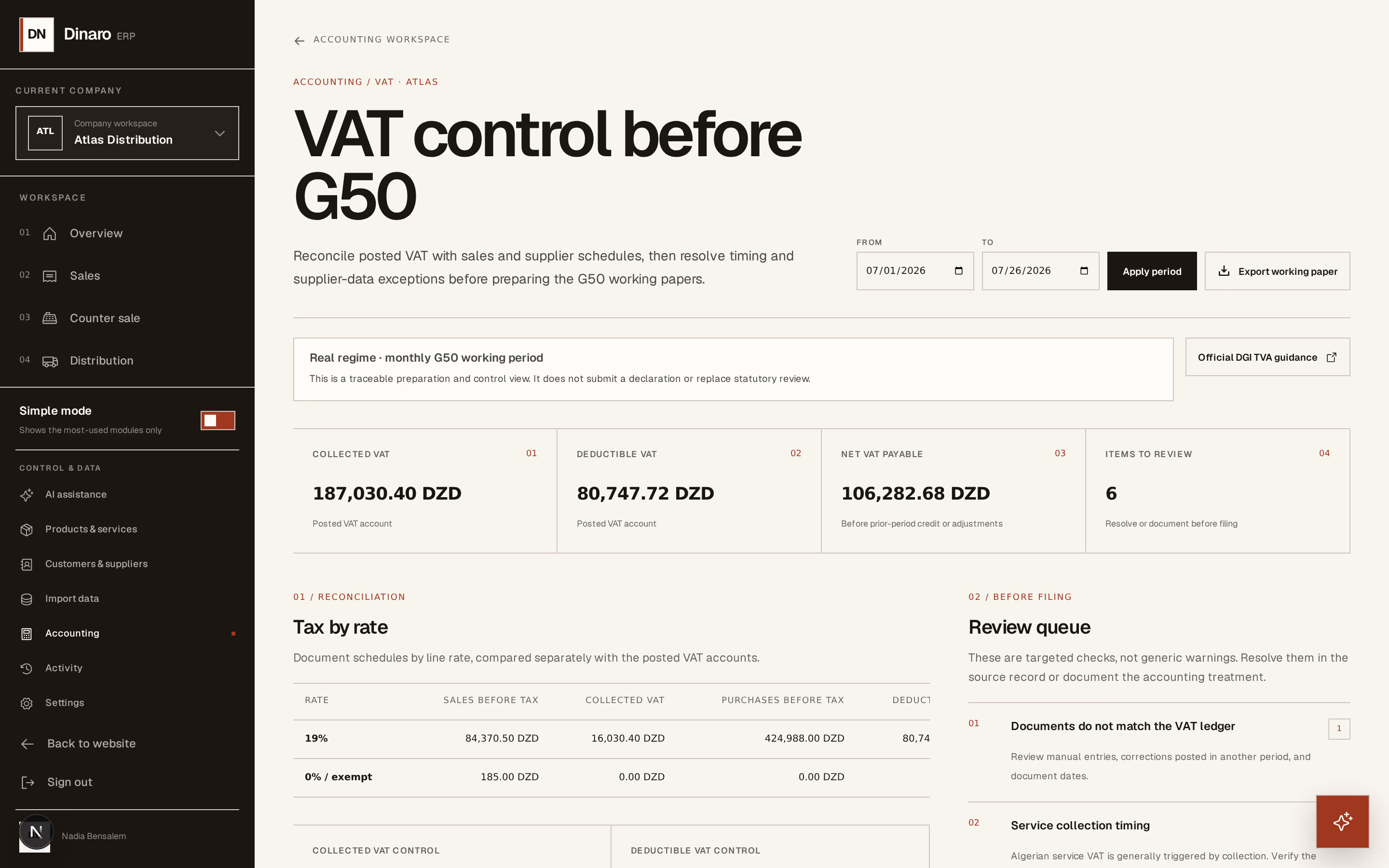
Reconcile the VAT your documents say you owe against the VAT actually posted, and clear the exceptions before you file.
- Steps
- 4 · About 3 min
- Who can do this
- Owner · Manager · Accountant
Before you start
This screen prepares and checks. It does not submit anything, and it does not replace your accountant — the page says so itself, in a banner you should read rather than scroll past.
What it does is answer the question you cannot answer from the invoices alone: does the VAT recorded on your documents agree with the VAT sitting in your accounts? When those two disagree, something was posted in the wrong period, corrected without its tax following, or entered by hand.
Set the working period
Accounting → VAT control before G50.

What to look at:
From — the start of the period you are filing.
To — its end.
Apply period recalculates everything below.
Horizon213 proposes the period your fiscal regime implies — monthly for the real regime, quarterly for the simplified one. That comes from your company settings, which is one more reason to have set the regime correctly at the start. A company under IFU is told it is not subject to VAT rather than shown a return to prepare.
The four figures across the top are the summary: collected, deductible, net payable, and how many items need review. The net figure is stated as being before prior-period credit and adjustments — it is an input to your G50, not the number you file.
Reconcile tax by rate
What to look at:
Tax by rate — for each rate, what your sales and purchase documents add up to, set against what is actually posted in the VAT accounts.
Read the two sides. Agreement means your documents and your ledger tell the same story for that rate. A difference is the whole point of the screen: it is telling you there is something to look at before you file, not after.
Work the review queue
Beside it, Review queue lists targeted checks rather than generic warnings — things like documents that do not match the VAT ledger, and service-collection timing.
Each one is resolved in the source record, or documented as a deliberate accounting treatment. Clearing them is the work; the totals are just the score.
Export and hand over
Export working paper produces the CSV your accountant works from.
That is where this screen stops. Preparing the G50 itself, deciding on prior-period credits, and filing are outside Horizon213 — and the page links to the official DGI TVA guidance for the rules themselves.
Treat the figures here as a control, not a declaration. They reflect what has been recorded in Horizon213 for the period you selected. If something was never entered, or was entered in the wrong period, this screen shows you the disagreement — it cannot know what is missing entirely.
Next, you might want to
- Post a manual journal entryRecord an accounting entry that no invoice, payment or stock movement produced — and only when that is really the case.
- Fill in your company's legal and fiscal identityEnter the identifiers that print on every document, and set the language, timezone and tax regime the company works under.