All guidesBuy
Match a supplier invoice to what arrived
Post what the supplier is charging you against what you actually received, so the debt and the input VAT are real.
- Steps
- 4 · About 2 min
- Who can do this
- Owner · Manager · Accountant
- Needs the module
- Buy
Before you start
Posting the supplier's invoice is what creates the debt. Until you do it you owe nothing on paper, however much stock is on the shelf, and the input VAT is not in your return.
It is posted against the order, so what you are charged is checked against what arrived rather than taken on trust.
Open the order and find the invoice section
Purchases, then the order. The supplier invoice form sits below the receipt history, once something has been received.
Have the supplier's paper invoice in front of you. You are copying from it.
Copy the reference and the dates
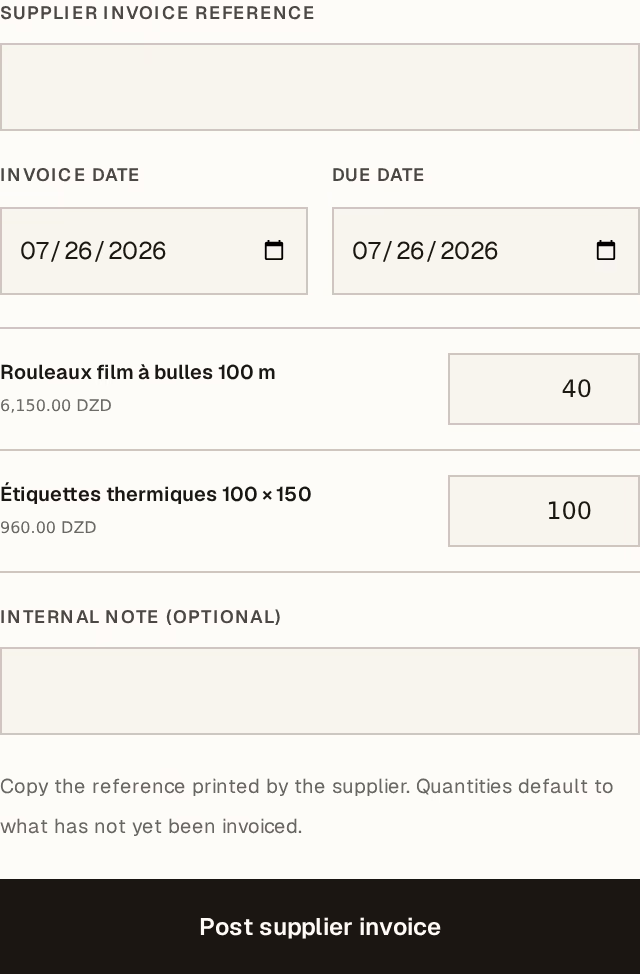
What to look at:
Supplier invoice reference — their number, exactly as printed. This is what you or your accountant will search for when they call about it, so copy it rather than inventing your own.
Invoice date — the date on their invoice, not today. It decides which period the input VAT falls into.
Due date — when they expect to be paid. It drives what appears in what you owe, and how late it is.
Quantities, per line — these default to what has been received but not yet invoiced, which is usually right. Change one only when the supplier is charging for something different, and if that happens, find out why before posting.
Press Post supplier invoice.
What that did
In one operation: the amount is now owed to the supplier, the input VAT is in your return, the receipt is marked as invoiced, and the accounting entries are posted. There is no second step and no way for those to disagree with each other.
Pay it
Payment is separate again. Pay from the order, or from Finance → Record money → Pay a supplier invoice, which is easier when you are paying several at once.
Charged for more than arrived? Do not adjust the quantity to make it balance. Post what the supplier actually invoiced, then ask them for a credit note and record it when it comes. The disagreement is a real event and the record should show it, not hide it.
A supplier invoice posted wrongly is corrected by a manager, with a reason. The original stays visible marked Corrected, and the payable, the VAT and the stock value all move back together.