All guidesBuy
Receive goods against a purchase order
Record what physically arrived, in full or in parts, and put it into stock at the price you agreed.
- Steps
- 4 · About 2 min
- Who can do this
- Owner · Manager · Team member
- Needs the module
- Buy
Before you start
Receiving is the moment stock becomes yours. Record it when the goods are physically in front of you and counted — not when the van is due, and not when the invoice arrives.
Record what actually came, not what the order said. A short delivery recorded in full is how a stock figure starts lying, and every later count disagrees with it.
Open the order
Purchases, then the order. Only a confirmed order can be received against.
Count what arrived and validate
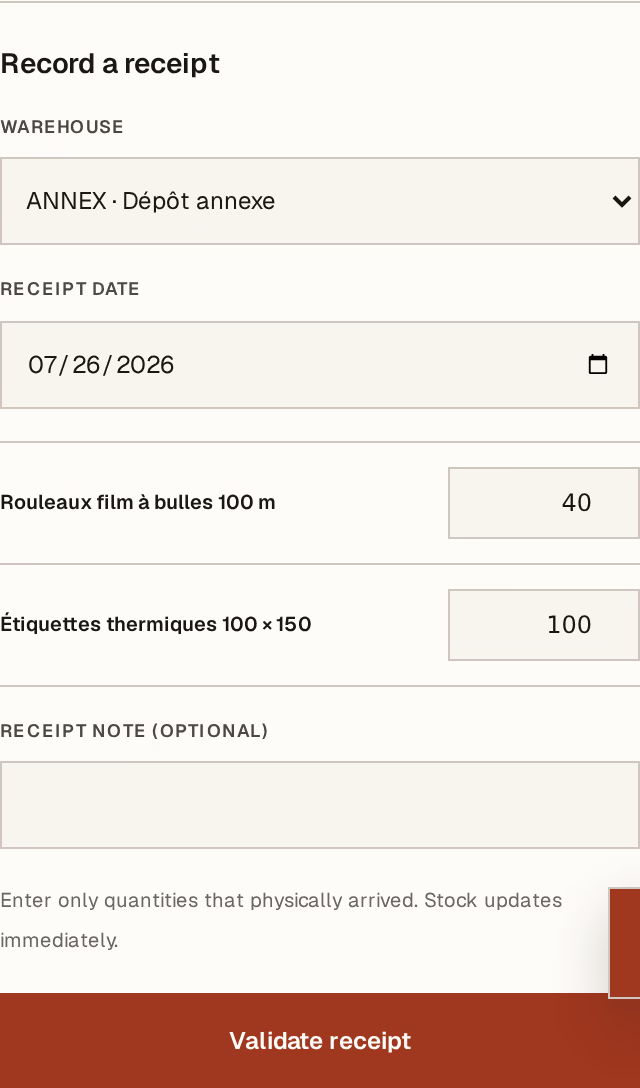
What to look at:
Warehouse — where the goods are going. Stock lands here, so a business with more than one warehouse should check it every time.
Receipt date — when they actually arrived.
Quantity, per line — what physically came, line by line. Leave 0 on anything that did not arrive; the order keeps count of what is still owed.
Validate receipt posts it. Stock moves immediately, at the unit cost on the order.
Receive as many times as the supplier delivers. Each receipt is numbered and kept, and the order shows what is still outstanding.
Record lot numbers and expiry dates
For anything with a shelf life, this is the only moment the information is in front of you — it is on the box now and will not be later.

What to look at:
Lot number — as printed on the packaging.
Expiry — the date on the box. Stock nearing its date leads the dashboard attention list, which is what turns this into money saved rather than data entry.
Press Save on the line.
This records what arrived and when it expires. It does not follow a lot through to the customer who bought it — Horizon213 cannot tell you which lot a particular sale drew from. If you need that, you need batch traceability, which this is not.
Then match the invoice
Goods in stock and money owed are two different events. The supplier's invoice is posted separately, against what was received — match it next.
If a receipt was recorded wrongly, a manager can reverse it. The original stays in the history and opposite stock movements are appended, so the trail still reads true. Horizon213 refuses a reversal that would push stock below zero.