All guidesPeople & HR
Plan an absence and approve leave
Record who is away and when, get the overlap checked, and approve or decline the request.
- Steps
- 4 · About 2 min
- Who can do this
- Owner · Manager · Team member
- Needs the module
- People & HR
Leave is recorded so that two people do not book the same week off and nobody finds out on the morning. Horizon213 checks the overlap for you and refuses a request that collides with one already approved.
Everything here is dates and counts. No medical detail belongs in this screen, and the note field says so.
Open People
People in the sidebar lists your employees, who is away today, and what is coming.
Record the absence
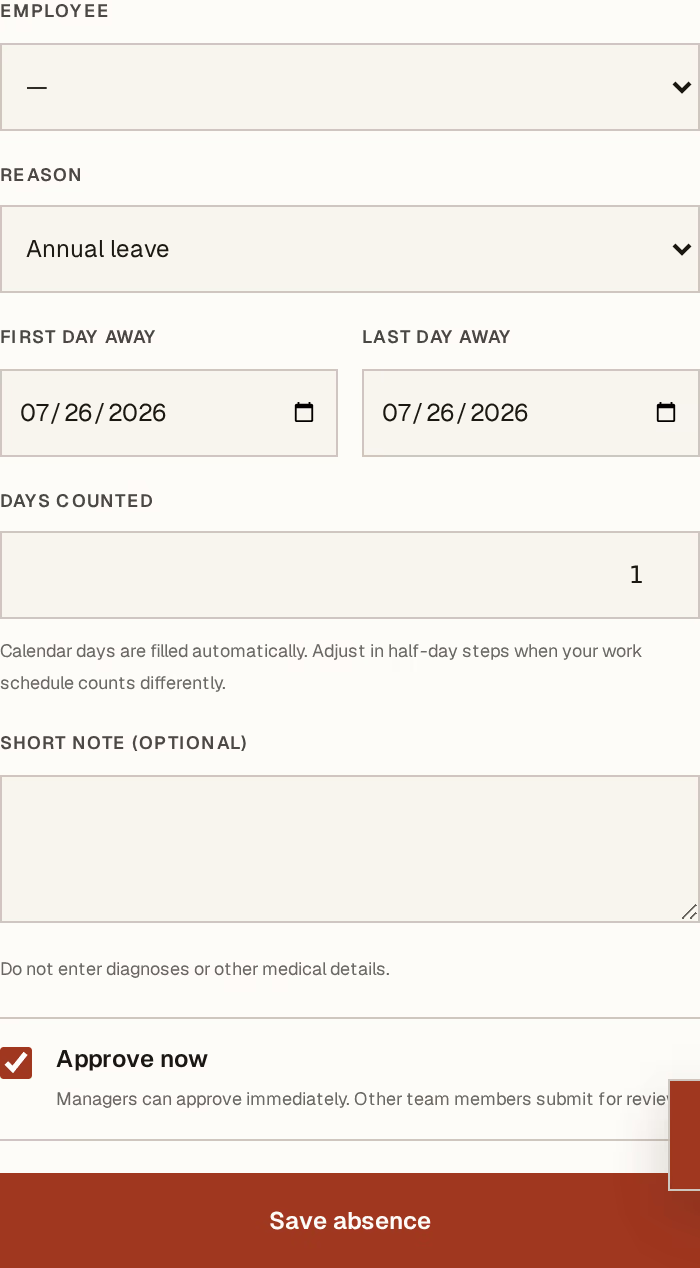
What to look at:
Employee — who is away.
Reason — Annual, Sick, Family event, Maternity, Unpaid, Training or exam, or Other authorised. The category is what makes the annual-leave total mean something at the end of the year.
First day away — and Last day away beside it. Both inclusive.
Days counted — filled in from the dates, and adjustable in half days for the afternoon off or the morning appointment.
Short note is for anything the team needs to know. Managers can tick Approve now to record and approve in one step, which is what you want when you are entering leave you have already agreed to.
Press Save absence.
Decide a pending request
Requests waiting on an answer sit at the top. Approve accepts it. Decline needs a reason — the person is going to ask, and a written answer is better than a remembered one.
Cancel approved leave handles the plan that changed. The history keeps both, so the record shows what was agreed and what actually happened.
Read the tiles
Away today, Upcoming, and Annual days approved answer the three questions people actually ask: who is missing this morning, what is coming, and how much of the year's entitlement has gone.
An overlapping request is refused, not flagged. That is deliberate: a warning gets clicked past, and the whole reason to record leave is to stop the clash before it reaches the rota.