All guidesSell
Issue a customer credit note
Put right an invoice that was wrong, goods that came back, or a discount agreed after the fact — without touching the original.
- Steps
- 4 · About 4 min
- Who can do this
- Owner · Manager · Accountant
- Needs the module
- Sell
Before you start
A confirmed invoice is never edited. When something has to be put right — the customer sent goods back, you overcharged, the price was renegotiated — you issue a credit note against it.
The invoice stays exactly as it was. The credit note sits beside it and reverses what it needs to: the value, the tax, and the stock if goods physically returned.
Open the invoice and start the credit note
Find the invoice in the Sales register and press Create credit note. It is tied to that invoice, so the lines and prices come across ready.
Say what happened and how much
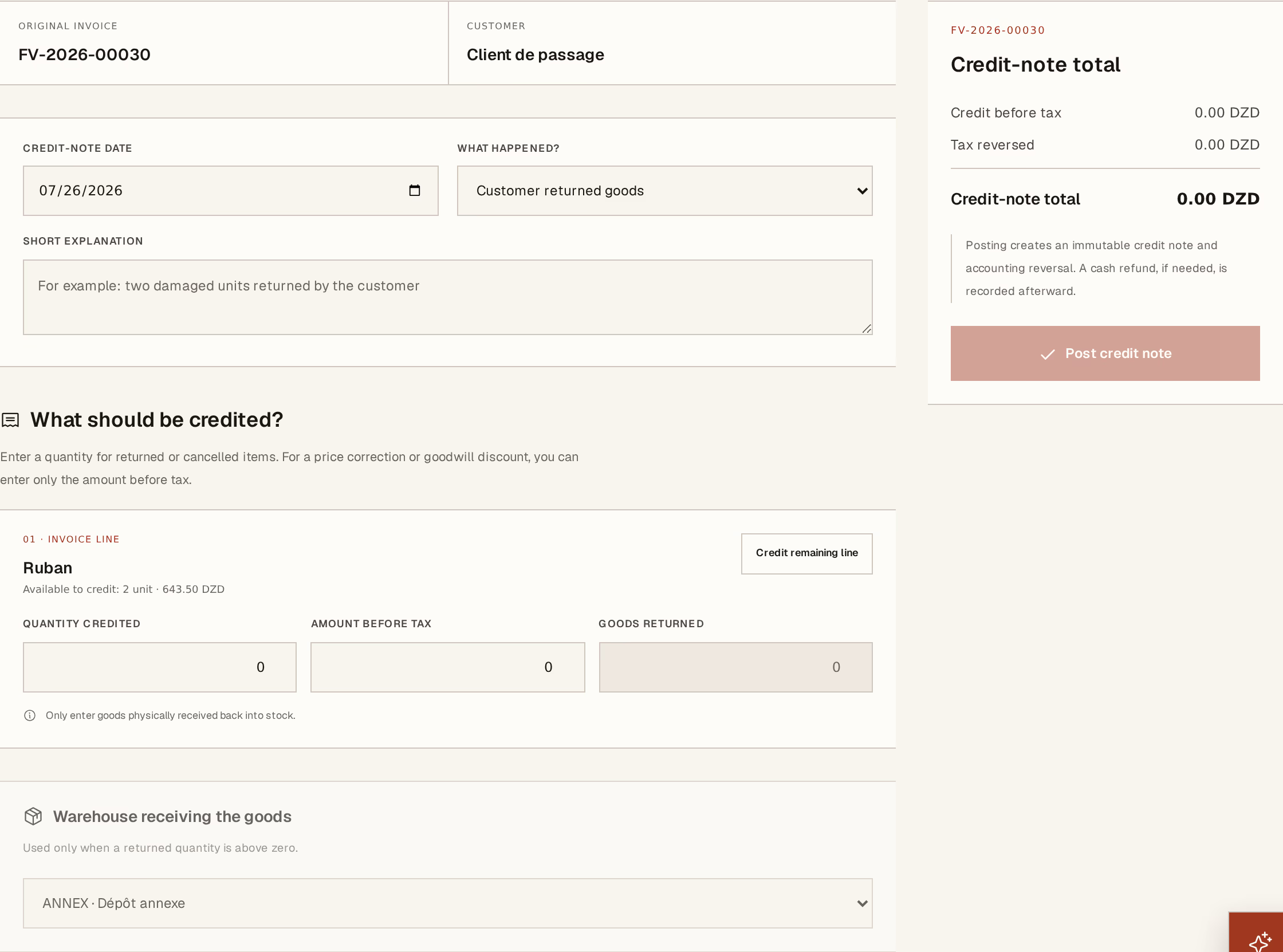
What to look at:
What happened? — Customer returned goods, Damaged or non-conforming, Price or invoice error, Commercial discount, Service issue, or Other. This is not filing: it is what tells you next year why your credits happen. Pair it with a short explanation in the field beneath.
Quantity credited — how much of that line is being credited. Credit remaining line fills it with everything not yet credited, which is the common case.
Goods returned — the quantity that physically came back. This is a separate number, and that is the point. A customer credited for damaged goods they threw away is credited 10 and returns 0.
Warehouse receiving the goods — where returned stock lands. Only needed when something actually came back.
You can also credit by amount before tax instead of by quantity, which is what a negotiated discount usually is: no goods move, only value.
Press Post credit note.
What it did
In one operation: the customer owes less, the VAT is reversed for the period the credit falls in, any returned stock is back on the shelf at its historical delivery cost, and the accounting entries are posted.
The original invoice now reads Credited, and both documents stay in the register. Anyone reading later sees the sale, the correction, and the reason — which is the whole point of working this way.
Refunding the money
A credit note reduces what the customer owes. It does not hand cash back.
Whether cash is even owed depends on one thing: cash exists only where what the customer has paid, plus their credits, comes to more than the invoice. Credit an unpaid invoice and there is nothing to refund — the credit simply lowers the bill, and the screen says no cash refund is due. That is the correct answer, not a fault, and it is where most confusion about refunds starts.
Where there is money to give back, the credit note offers Refund the customer:
Available to refund — the ceiling, and the number to read first. It is the customer's credit balance, not the credit note's total.
Cash or bank account — where the money leaves from. Your treasury moves the moment you post.
Amount, refund date and method — cash, bank transfer, cheque. A reference is optional and worth filling for anything that is not cash.
Most credits are settled against the next invoice rather than refunded, so this is a separate, deliberate act. Horizon213 does not assume which you meant.
If a refund itself was wrong, correct the refund before reversing the credit note — the screen will refuse the other order, because a reversed credit note with a live refund hanging off it makes no sense.
Credit notes are accountant-controlled, and posting one is final. If the credit note itself is wrong, it is corrected the same way everything else is: by cancelling it with a reason, which leaves both visible.