All guidesSell
Record a customer payment
Enter money received against an invoice, in full or in parts, so what you are owed stays true.
- Steps
- 3 · About 2 min
- Who can do this
- Owner · Manager · Team member
- Needs the module
- Sell
Before you start
Recording a payment is what tells Horizon213 the debt is settled. Until you do it, the invoice stays in what customers owe you, and the customer keeps appearing on reminders and statements — however long ago the cash actually arrived.
Payments go in one at a time and can be partial. Three payments against one invoice is normal and needs no special handling.
Open the invoice
Find it in the Sales register — filter by Confirmed or Partially paid if the list is long — and open it. The payment form is on the invoice's own page.
Enter what you received
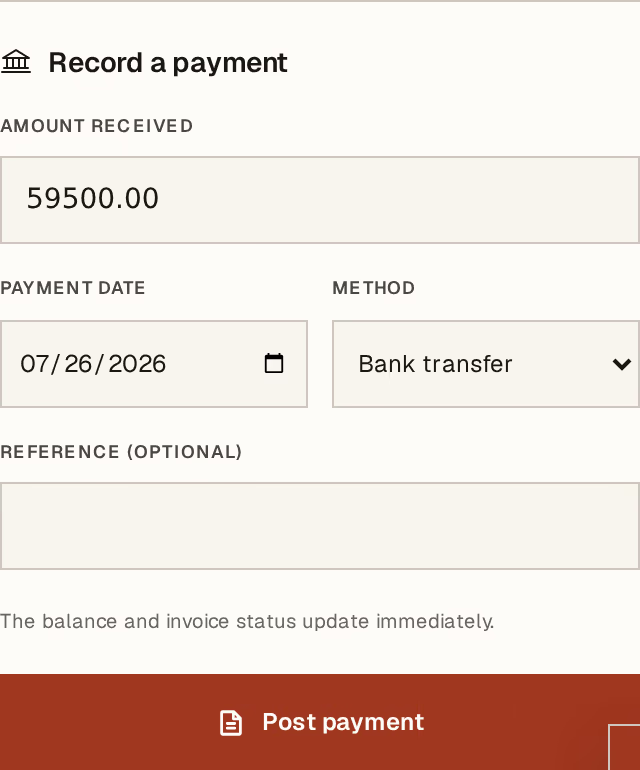
What to look at:
Amount received — what actually arrived, not what the invoice says. If the customer paid half, enter half; the invoice becomes Partially paid and keeps the rest open.
Payment date — the day the money arrived. This drives your cash position and your ageing, so backdating a payment you received last week is right, not a fudge.
Method — Cash, Bank transfer, Cheque, Card, Postal account, or Other.
Post payment records it.
A cheque you have taken but not banked is not a payment yet. Record it in the cheque register instead, and it becomes a payment when it clears. A post-dated cheque is a promise, and treating it as cash makes your cash position lie.
Check it landed
The payment appears under Payment history on the invoice, and the status moves on its own: Paid when nothing is left, Partially paid while some is.
The money also reaches the cashbook and your accounts in the same operation — there is no second step, and no way for the two to disagree.
If a payment was entered wrongly — wrong amount, wrong invoice, wrong day — it is corrected by reversal, not by editing. The original stays visible marked Corrected, with the reason beside it, and cash, the invoice balance, and the accounting entries all move back together. Post the right one afterwards.