All guidesSell
Record a delivery against an invoice
Record the goods that physically leave, in full or a part at a time, and move stock with them.
- Steps
- 3 · About 2 min
- Who can do this
- Owner · Manager · Team member
- Needs the module
- Sell
Before you start
Invoicing and delivering are separate acts in Horizon213, on purpose. You can invoice a full order and send it out in three vans over two weeks, and the invoice keeps count.
Recording a delivery is what moves stock. Until you do it the goods are still yours on paper, however far down the road they are.
Open the invoice
Find it in the Sales register and open it. The delivery form is on the invoice's own page, folded away under a summary until you ask for it.
Only a confirmed invoice can be delivered against. A draft has not committed to anything yet, so there is nothing to send.
Fill in what is leaving now
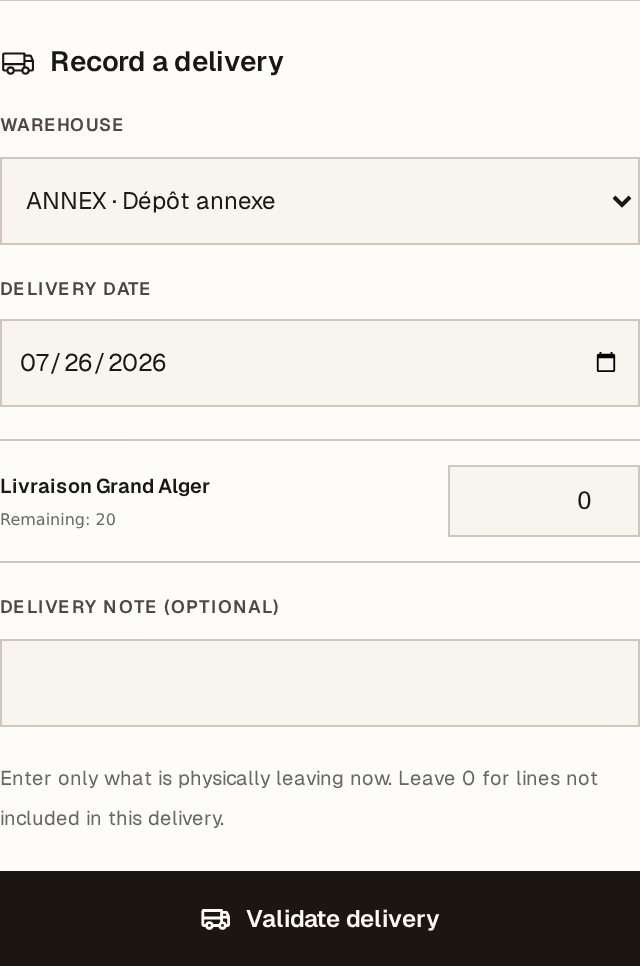
What to look at:
Warehouse — where the goods are leaving from. Stock comes off this one.
Delivery date — when they actually left, which may not be today.
Quantity, per line — this is the important field. Enter only what is physically going out now, and leave 0 on the lines that are not in this load. The invoice tracks Delivered and Remaining for you.
Validate delivery posts it: stock moves, the delivery note gets its number, and the remaining quantities drop.
Horizon213 will refuse to take stock below zero. If a line will not validate, the warehouse does not hold what you are trying to send — check the warehouse first rather than adjusting the quantity to make the form accept it.
Hand over the paperwork
Each validated delivery appears under Delivery history on the invoice, with its own number. From there, Print delivery note produces the A4 BL with address, lines, and signature blocks for whoever prepared it, whoever handed it over, and the customer.
Send the same invoice out again as many times as it takes: repeat step 2 for the next load, and the Remaining column tells you what is still owed.
If a delivery was recorded wrongly, a manager can reverse it. The original note stays exactly as it was and the stock comes back through an opposite movement — nothing is edited away, so the history still reads true.