All guidesSet up your company
Invite a teammate and choose what they can do
Send an expiring invitation link scoped to the companies and the level of access you choose.
- Steps
- 3 · About 2 min
- Who can do this
- Owner · Manager
People are invited, never created. You send a link, they set their own password, and the account belongs to them from the start — there is no shared login and no password of theirs that you know.
An invitation is bound to the email address you type, expires in 14 days, and carries exactly the access you chose. Accepting it with a different account is refused.
Open Team access
Settings → Team access, or go straight to Access from the sidebar. The first section lists everyone who already has access and what they can do.
Fill in who, where, and how much
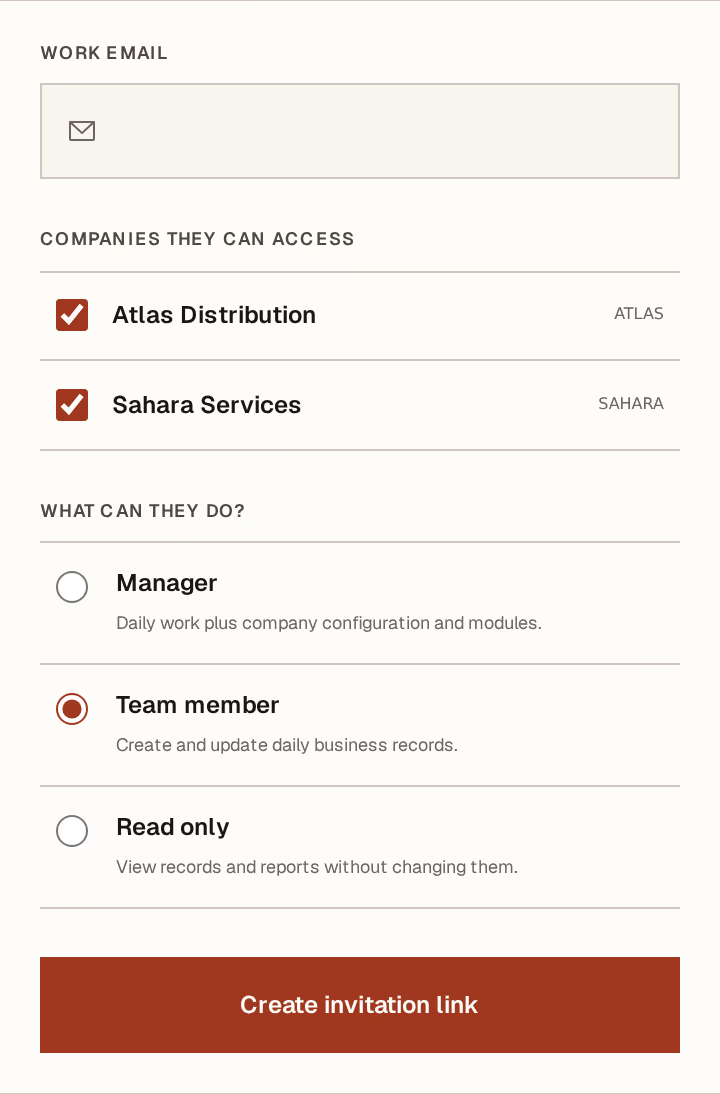
What to look at:
Work email — the address the invitation is bound to. Use their real work address; it is what they will sign in with.
Companies they can access — tick each one. A workspace with several companies can give someone one of them and no more, and they will never see the others exist.
What can they do? — three levels:
Manager — daily work, plus company configuration and modules.
Team member — create and update daily records. No settings, no imports, no team access.
Read only — every register and report, no mutation controls at all.
Create invitation link generates it.
The link is shown once. Copy it before you leave the page — there is no way to see it again, only to revoke it and issue a new one.
Send it, and follow up
Send the link however you normally reach them. When they open it they see the email it was issued to, the access level, and the companies, then accept.
Until they do, it sits under Pending invitations, where you can Revoke it. Revoke anything sent to the wrong address rather than hoping it is not used.
Afterwards, the person appears in the first section, where you can change which companies they reach or what they may do, and Save access. Changes apply the next time they load a page.
Read-only access is enforced twice: the controls are not drawn, and the database refuses the write even if a request is crafted by hand. It is a real boundary, not a hidden button.