All guidesStock
Read your stock, and how it got there
What you hold now, and the dated trail of every movement that made it that number.
- Steps
- 4 · About 3 min
- Who can do this
- Owner · Manager · Accountant · Team member · Read only
- Needs the module
- Stock
Inventory answers two questions on one screen: what do I hold, and how did it get to be that number.
The first is a list of products with a quantity per warehouse. The second is the part worth learning, because every quantity in this product comes from a dated movement. There is no field anywhere that sets a stock level directly.
Read the ledger
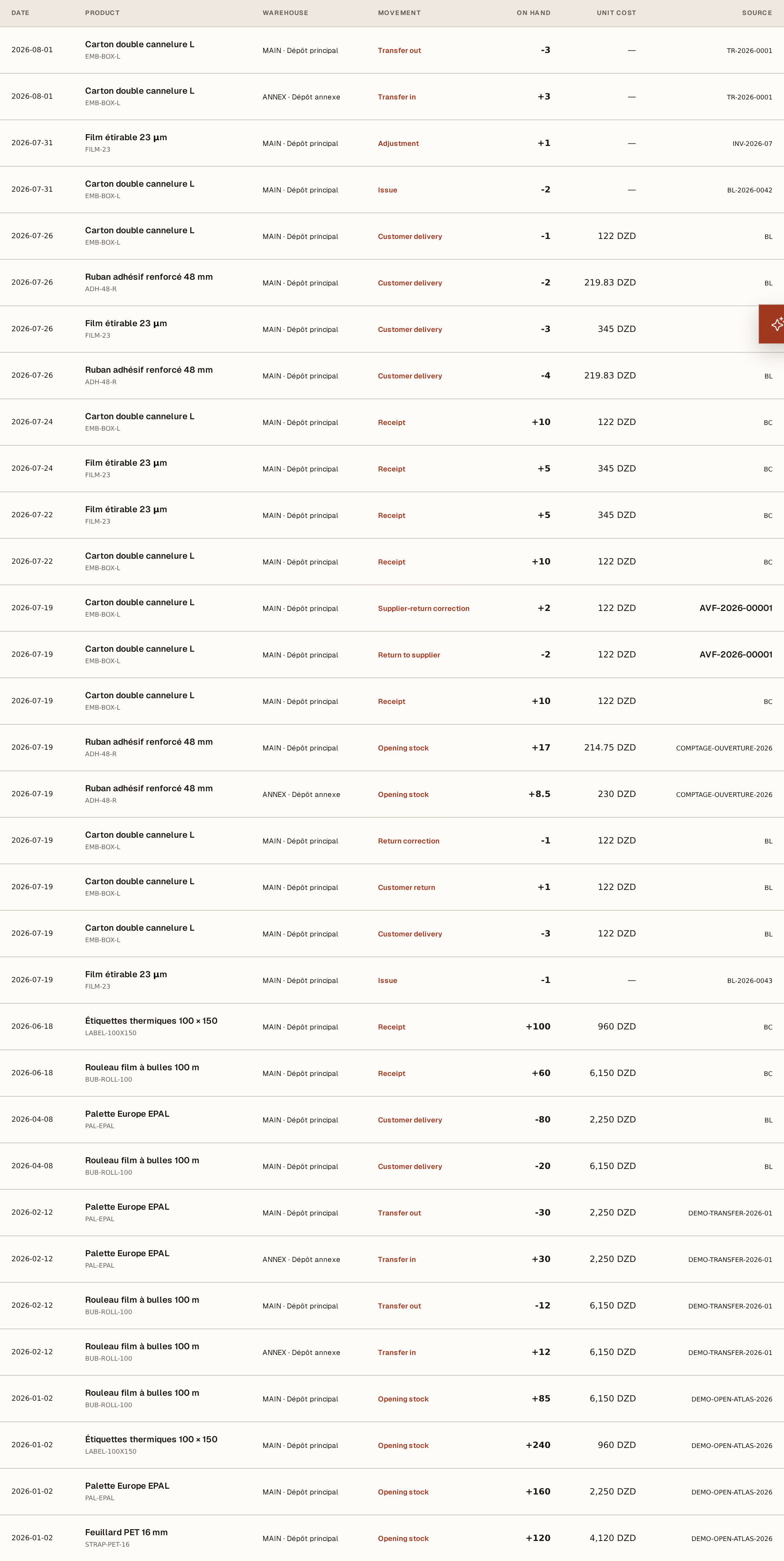
What to look at:
The columns — date, product, warehouse, what kind of movement it was, the quantity it moved, its unit cost, and the source document. That last column is the point of the whole table: every line names the thing that caused it.
A line — signed, so a movement out reads negative and a movement in reads positive. Read the source and you know why: a delivery note, a purchase receipt, a till sale, an adjustment, a transfer.
Receipts, issues, adjustments and transfers all share this one ledger. Nothing moves stock without appearing here.
Transfers come in pairs
A transfer between warehouses writes two lines with the same reference — one out of the source and one into the destination. You will see the same document number twice, once negative and once positive.
That is why a transfer changes nothing about how much you own in total. It is also how you check one went through properly: if you can see only one half of the pair, something is wrong.
Unit cost, and the blanks
The unit cost column carries the value the movement moved at, and it is often blank — because a transfer or a count adjustment does not change what your stock is worth per unit, only where it sits or how much of it there is.
The figures that do carry a cost are the ones that touch the moving average: receipts bring goods in at what you paid, and sales take them out at the average of the moment.
Where to look next
Two lists sit above the ledger and are worth a glance each morning: stock to reorder, which is everything at or below the minimum you set, and nearing its date, which lists lots you still hold that are close to expiry. A lot already sold through is not listed, so what you see there is what you can still act on.
Further down, inventory value concentration ranks products by the value sitting in them — the quickest read of where your cash is tied up.
If a balance looks wrong, do not reach for an adjustment first. Read the ledger for that product: the wrong number nearly always has a wrong line behind it, and correcting the line is honest where adjusting the total is a second error laid on top of the first.
Next, you might want to
- Record a stock movementAdjust, issue or transfer stock by hand, when goods move for a reason no document covers.
- Set a minimum and get told what to reorderGive a product a floor, and Horizon213 tells you when it drops through it instead of you noticing at the shelf.
- What your stock is worthHorizon213 values stock at a moving weighted average, per company. This is why the figure changes when you buy, and not when you sell.