All guidesStock
Record a stock movement
Adjust, issue or transfer stock by hand, when goods move for a reason no document covers.
- Steps
- 3 · About 2 min
- Who can do this
- Owner · Manager · Team member
- Needs the module
- Stock
Most stock moves on its own: a receipt brings it in, a delivery or a counter sale takes it out. This screen is for the rest — the breakage, the sample, the count that disagrees with the system, the pallet moved between warehouses.
Use it for what the documents cannot explain, and never to make a number look right. A stock figure that has been nudged is a figure nobody can trust again.
Open Inventory
Inventory in the sidebar shows what you hold, where, and what it is worth. The movement form is on the same screen.
Say what happened
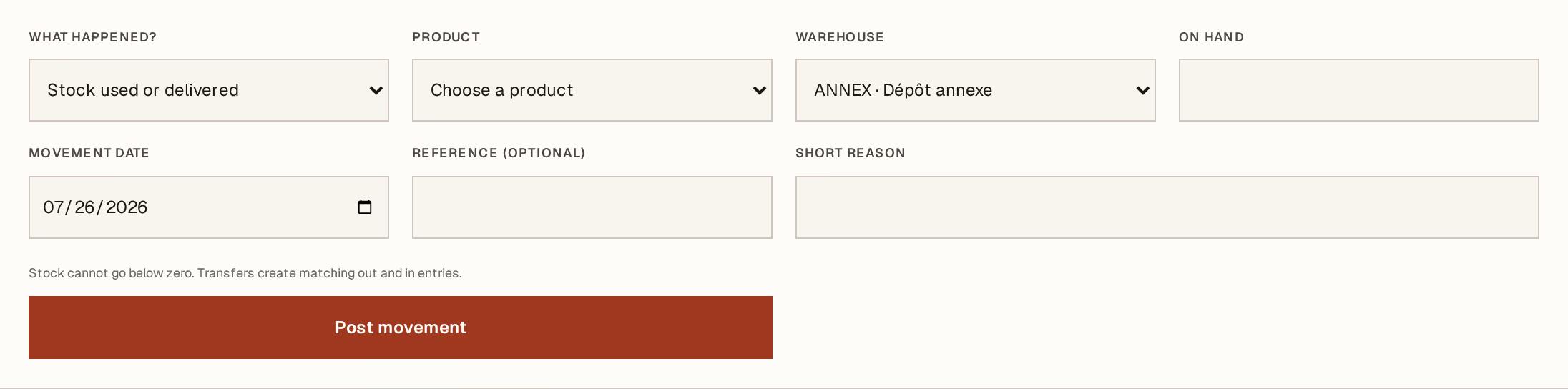
What to look at:
What happened? — four kinds, and choosing honestly is the whole point:
Stock used or delivered — it left, for a reason with no invoice behind it: a sample, an internal use, breakage.
Count adjustment — add / — remove — the shelf and the system disagree and the shelf is right.
Transfer between warehouses — it moved. A second field appears for the destination, and Horizon213 writes both halves.
Warehouse — where it is moving from.
Quantity — how much. Always a positive number; the kind decides the direction.
Post movement records it.
Choose the product above, set the movement date to the day it really happened, and use Short reason properly. It is the only thing that will explain this line to whoever reads it in six months.
Stock cannot go below zero. If a movement is refused, the system does not believe you hold what you are removing — and it is usually right. Find the missing receipt rather than adjusting until the form accepts it.
Check what it did
The movement appears in the ledger below with its kind, quantity, reason and whoever posted it. Balances update immediately.
Adjustments change your stock value as well as the count, at the moving weighted-average cost. A large adjustment is therefore a real number in your accounts, not just a tidier shelf — which is why counts are worth doing carefully rather than often.
Goods leaving against an invoice belong on the invoice, not here — that is a delivery, and it keeps the customer's remaining quantities right. Recording it as a stock issue instead breaks the link between what was sold and what was sent.