All guidesBuy
Record a supplier credit
Enter the credit note your supplier issued you — for goods sent back, an overcharge, or a discount agreed after the invoice.
- Steps
- 4 · About 3 min
- Who can do this
- Owner · Manager · Accountant
- Needs the module
- Buy
Before you start
The mirror of a customer credit note, and the difference matters: you are not issuing this one. Your supplier issued it to you, and you are recording what they sent.
That is why the first field is their reference, not yours. This document exists in their system already; you are bringing it into yours.
Open the bill and start the credit
Purchases, open the supplier invoice, then create a credit note against it. The lines and prices come across from the bill.
Only a posted supplier invoice can be credited — there is nothing to reverse until there is something recorded.
Copy their credit note
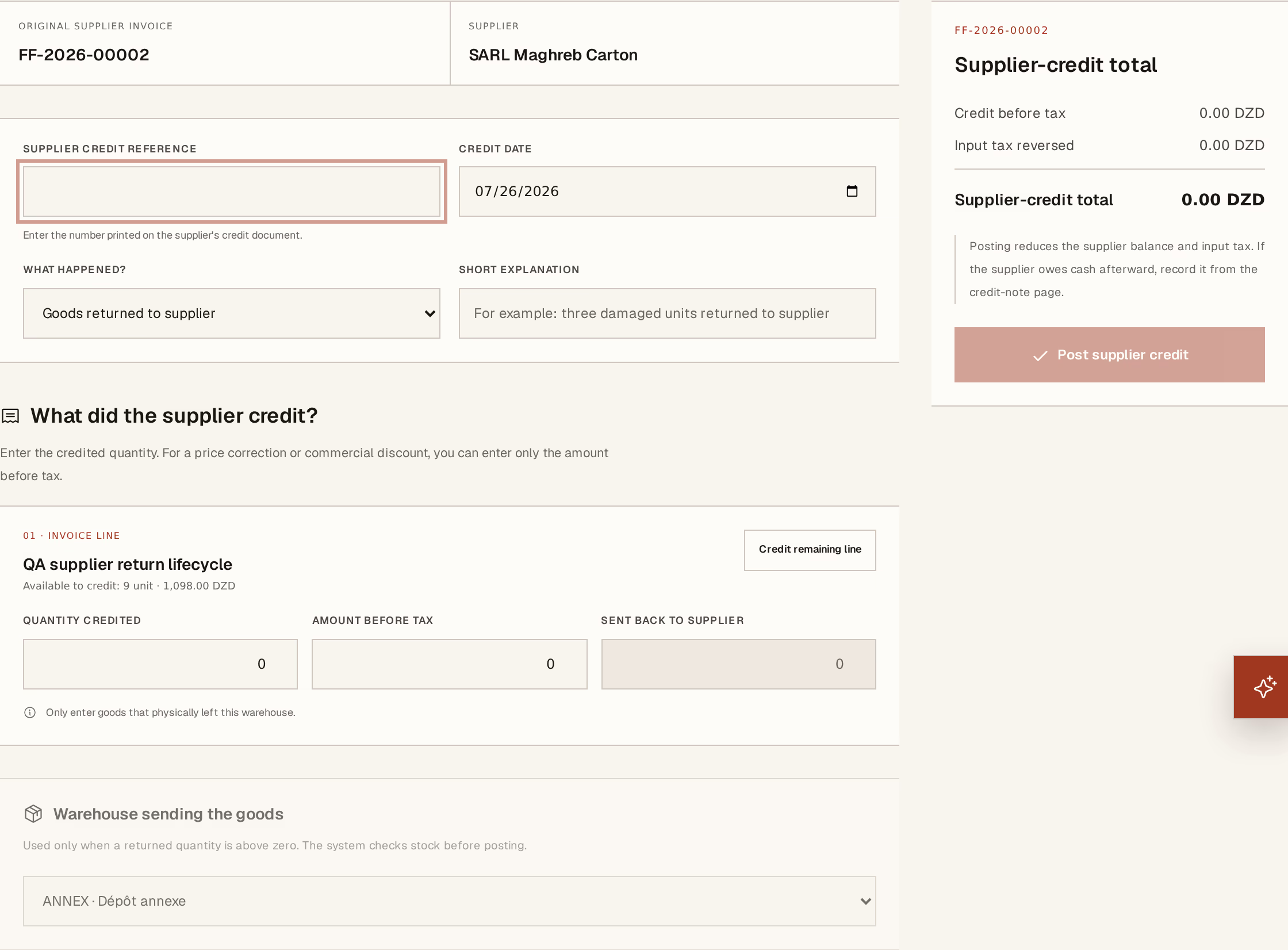
What to look at:
Supplier credit reference — their number, exactly as printed. Copy it; this is what they will quote when you ask why the payment is short.
What happened? — Goods returned, Damaged, Price error, Commercial discount, Service issue, or Other, with a short explanation beneath. Over a year this list tells you which suppliers cost you time.
Quantity credited — how much of the line they are crediting.
Goods returned — what physically went back, with the warehouse sending the goods. Separate from the credited quantity, because a supplier crediting you for something damaged that you scrapped is crediting 10 and receiving 0.
You can credit by amount before tax instead of by quantity, which is what a negotiated discount usually is.
Press Post supplier credit.
What it did
You owe the supplier less, the input VAT is reversed for the period, any goods sent back have left your stock at their cost, and the accounting entries are posted. The original bill reads Credited and both documents remain.
Your stock value moves too — returning goods removes them at the moving average, not at the price on their credit note.
Getting the money back
A credit reduces what you owe. It does not fetch cash.
Cash is only owed to you where what you have paid, plus your credits, comes to more than the original bill. Credit a bill you have not paid and there is nothing to collect — the credit is already reducing the supplier balance, and the screen says so. Most supplier credits live and die exactly like that, settled against the next invoice with no further action.
Where the supplier really is sending money back, the credit note offers Record cash from supplier:
Available to receive — the ceiling. Read it before you agree an amount on the phone.
Cash or bank account — where the money lands. Your treasury moves on posting.
Amount, receipt date and method, with a bank or cheque reference — fill that in; it is what ties this to a line on your statement when you reconcile.
If the refund itself was entered wrong, correct the refund before reversing the credit — the screen refuses the other order.
Record what the supplier actually credited, even if you disagree with it. If they credited less than you expected, that disagreement is a real thing to take up with them — entering the figure you think is right makes your payable disagree with theirs and turns one conversation into two.
Next, you might want to
- Match a supplier invoice to what arrivedPost what the supplier is charging you against what you actually received, so the debt and the input VAT are real.
- Issue a customer credit notePut right an invoice that was wrong, goods that came back, or a discount agreed after the fact — without touching the original.