All guidesFollowing up customers
Log what happened
Keep a dated record of every call, visit and message about a deal, and set the next action in the same breath.
- Steps
- 4 · About 3 min
- Who can do this
- Owner · Manager · Team member
- Needs the module
- Following up customers
Before you start
A potential sale carries one dated next action. That says what you intend to do. It cannot say what you already did, because doing it means writing over it: the call on Tuesday disappears the moment somebody types visit on Thursday on top.
So a salesperson asked what is happening with El Wiam has nothing to read. The log fixes that, and nothing else about the five stages changes.
Log an activity
Open a deal from the board or the list, then scroll to What happened at the bottom of the drawer.
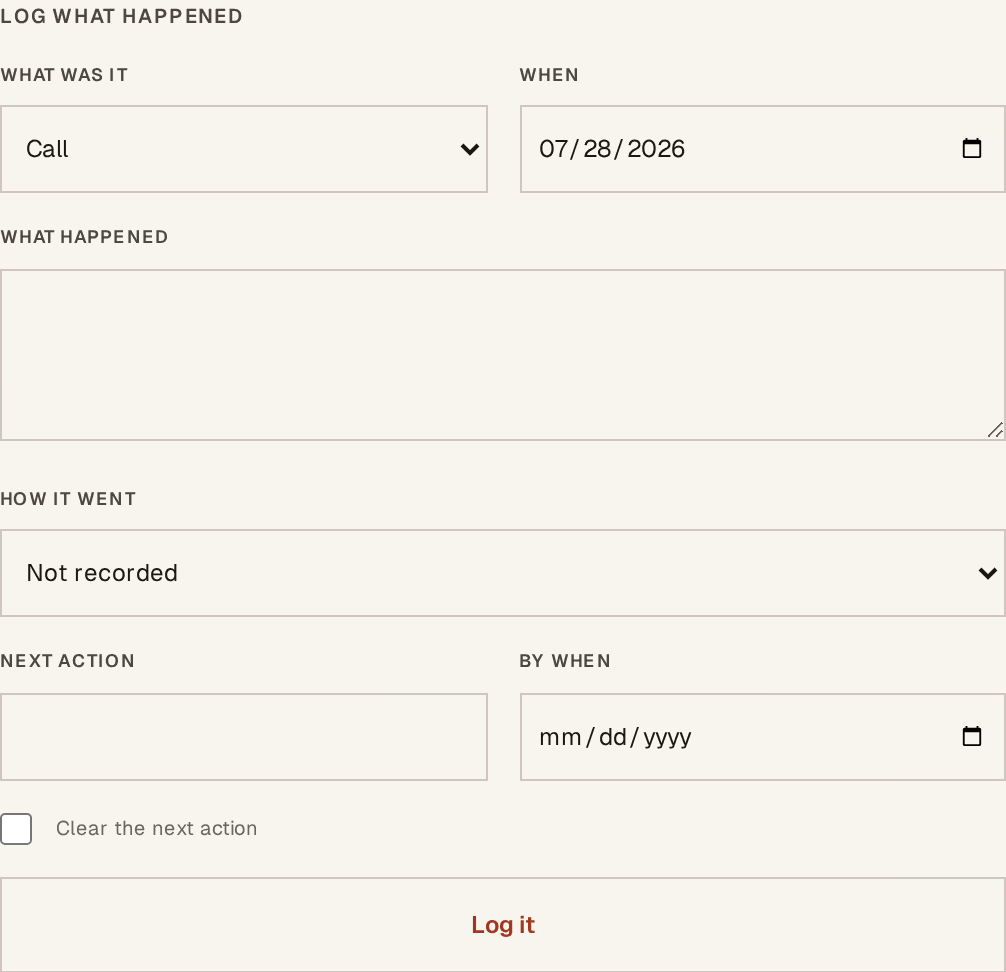
What to look at:
What was it — call, visit, WhatsApp, email, meeting, or note.
When — the day it happened, not the day you are typing it.
What happened — a sentence. This is what a colleague reads in six weeks.
How it went — went well, neutral, went badly, no answer. Optional, and worth using: no answer three times in a row is itself information.
Set the next action in the same submit
Underneath, the same form carries Next action and By when.
That pairing is the point. Recording what you did is also the moment you decide what happens next, and making those two separate screens is how next actions go stale. Fill both, and the card on the board updates its due date as you save.
Leave them blank to log the activity without changing what is due. Tick Clear the next action when the deal genuinely has nothing outstanding — it is finished, or it is waiting on the customer.
Entries are never edited
There is no edit and no delete on a logged activity. A wrong one is corrected by adding the correction.
A follow-up history that can be rewritten answers nothing — the whole reason to read it is that it is what actually happened. Corrections are reversals is the same principle everywhere else in Horizon213.
Whose deal it is, and where it came from
The drawer also carries three fields that make a shared board workable:
Followed by — the colleague chasing it. The board has an Only mine filter that uses it, which is what makes one board usable by three people.
Came from — referral, walk-in, WhatsApp, tender, campaign, and so on. Answer it at creation and a year later you can say which channel is worth the effort.
Why it was lost — a category beside the free-text reason, on lost deals. The sentence explains one deal to a person; the category is what turns why do we lose into a figure.
Preparing a quotation from a deal now records which deal it came from, so a won sale reads against what was actually quoted rather than the estimate typed at the start. Write a quotation covers the rest of that handoff.