All guidesPeople & HR
Reverse a posted payroll
Undo a whole payroll month — the expense, the liabilities and the payment — when it was posted wrong.
- Steps
- 3 · About 3 min
- Who can do this
- Owner · Manager · Accountant
- Needs the module
- People & HR
Before you start
Posting a payroll month does four things at once: it books the salary expense and the employer's contributions, it records what you owe CNAS and the tax authority, it pays the net salaries out of a treasury account, and it locks the month.
If any of that was wrong, you undo all of it together. There is no way to adjust one employee's line on a posted month, and that is deliberate — a month where the payslips and the accounts disagree is worse than a month that was posted twice.
Open the posted month
Payroll, then choose the month from the monthly history. A posted month reads Posted and paid and offers Correct this payroll.
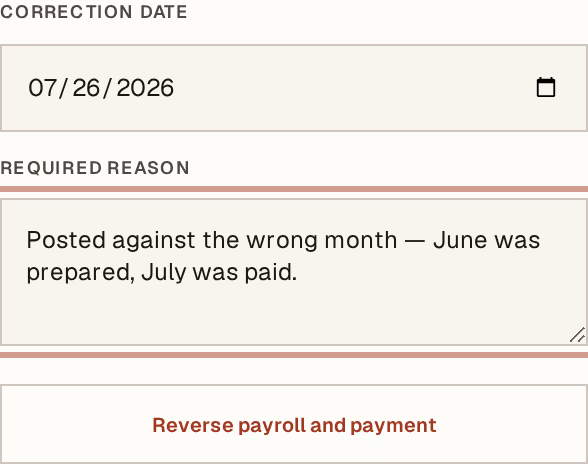
What to look at:
Correction date — when the reversal takes effect. It cannot be earlier than the payment date; you are undoing something that has already happened. If the month it was posted in has since been closed, use a date in an open period.
Required reason — not optional, and not a formality. Wrong month posted, bad IRG rate, bonus entered against the wrong employee. This line is what a labour inspector or your own accountant will read next to a pair of opposing entries.
Reverse payroll and payment — one press, and all four things unwind together.
What it did
The salary and contribution expenses are reversed, the CNAS and IRG liabilities come back off, the net payment returns to the treasury account it left, and the month unlocks.
The original month stays in the history, marked as reversed and carrying the reason you typed. Its payslips remain readable — they are what your employees were given, and pretending otherwise helps nobody.
Then prepare the month again, fix what was wrong, and post it. The corrected month produces new payslips.
When it will refuse
A payroll payment matched on a bank statement. Unmatch it first. A reconciliation pointing at a reversed payment is a worse problem than the one you are fixing.
A closed accounting period. Choose a correction date that falls in an open one, or reopen the period first if the correction genuinely belongs there.
Reversing payroll needs accountant or company-manager access, like posting it did.
The money has usually already reached your employees. Reversing the payroll corrects your books; it does not take cash back out of anyone's hands. Work out what each person was actually paid against what they should have been, and settle the difference deliberately — the reversal is bookkeeping, not the conversation.
Next, you might want to
- Run a payroll monthPrepare the month, adjust what needs adjusting, then post and pay in one operation.
- Read and print a payslipOpen one employee's payslip for a posted month, and understand every line on it.
- Why nothing here is ever editedHorizon213 corrects mistakes by posting the opposite, not by changing what was written. This is the rule behind almost every "you cannot" in the guides.