All guidesPeople & HR
Set up payroll
Set what each person earns and which rates apply, once, before you run a month.
- Steps
- 3 · About 4 min
- Who can do this
- Owner · Manager · Accountant
- Needs the module
- People & HR
Two things have to be right before you run a payroll month: what each person earns, and which rates apply. Both are set once and then left alone, which is the point — a month you run should be arithmetic, not decisions.
Both live at the bottom of the Payroll screen, under Salary setup.
Set what each person earns
One profile per employee, holding the values that repeat every month.
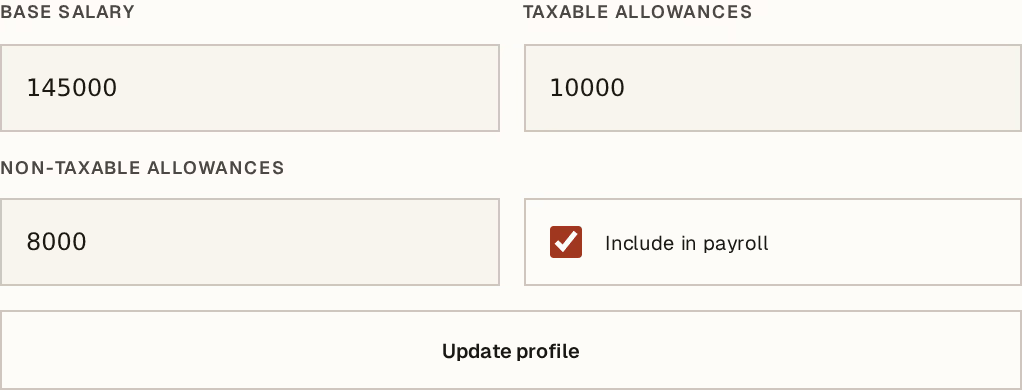
What to look at:
Base salary — the monthly gross, before anything is added or taken off.
Taxable allowances — what is added to pay and is subject to IRG and social contributions.
Non-taxable allowances — what is added but is not. The distinction is legal, not a preference; if you are unsure which side something falls, ask your accountant before the first run rather than after.
Include in payroll — only ticked profiles enter a new month. Untick it when somebody leaves, instead of deleting the profile: the months they were paid in still need to make sense.
Put only recurring values here. A bonus this month, or a one-off deduction, belongs to the month it happened in and is entered on the employee's line while you run that month. Putting a one-off in the profile pays it again in December.
Set the rates, with a date on them
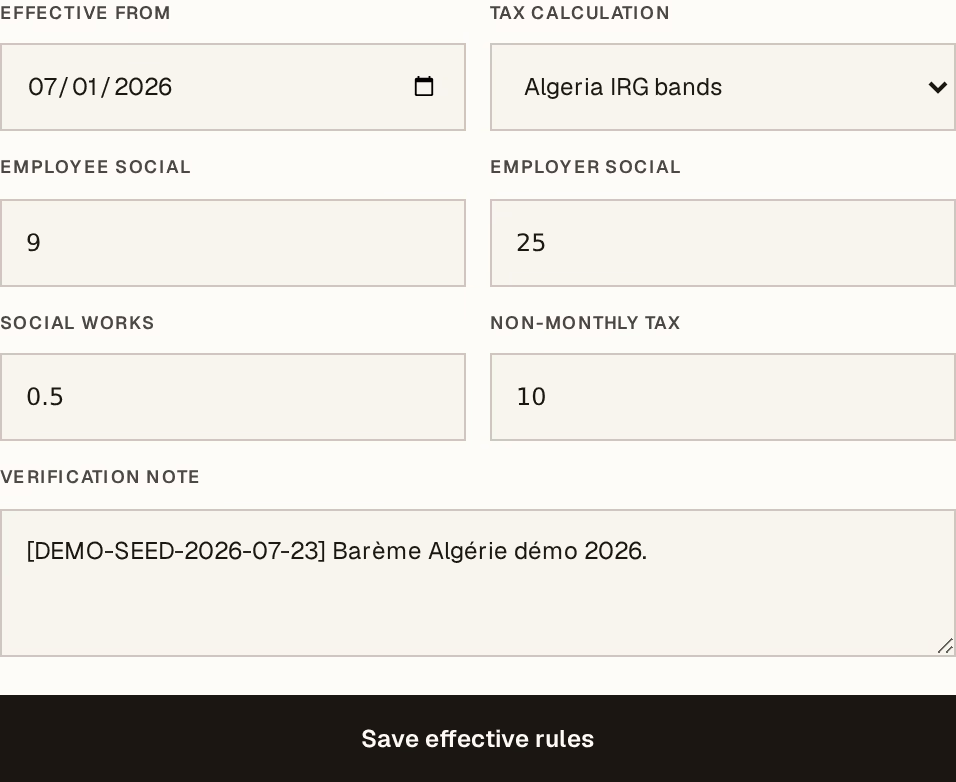
What to look at:
Effective from — the date this version starts applying. This is the field that matters most on the screen.
Tax calculation — Algeria IRG bands applies the published salary bands. Manual income tax switches that off and lets you enter the tax per employee line, for the cases the bands do not cover.
The rates — employee social, employer social, social works, and the rate for non-monthly items. The values shipped follow the standard CNAS split; they are a starting point.
Verification note — free text, and worth writing properly: who checked these against what, and when. In two years this is the only thing that answers "where did 9% come from?".
Three more fields on the same form come from your collective agreement rather than from anything national: the seniority premium per year of service with its ceiling, the overtime uplift, and the night uplift. Overtime ships at the ordinary fifty percent. The other two start at zero, because there is no single Algerian figure to default them to honestly and putting money on a payslip nobody agreed to is worse than leaving a field empty. Night hours matter most to businesses that work them — guarding above all — and they are entered on the attendance month.
Rules are versioned by date, never edited in place. When a rate changes, add a new version with the date it takes effect. Months already posted keep the rates they were posted with, and the new version applies from its own date forward. This is why a rate change does not quietly rewrite last year.
Then run a month
With profiles active and rules dated, the month itself is short: prepare it, check the lines, and post.
Payroll setup is a manager or accountant job, like everything else that reaches the accounts. Who can do what covers the rest.
The Algerian rates and IRG bands that ship with Horizon213 are defaults, not advice. Verify them against the current barème before you post your first month — posting is what creates real liabilities to CNAS and the tax authority, and a wrong rate discovered in March is three months of payslips to correct.
Next, you might want to
- Run a payroll monthPrepare the month, adjust what needs adjusting, then post and pay in one operation.
- Plan an absence and approve leaveRecord who is away and when, get the overlap checked, and approve or decline the request.
- Who can do whatThe four levels of access, what each one really means, and why read-only is a wall rather than a hidden button.