All guidesPeople & HR
Record the attendance month
Fill in one sheet a month so payroll stops asking somebody to remember who turned up.
- Steps
- 5 · About 3 min
- Who can do this
- Owner · Manager · Team member
- Needs the module
- People & HR
Before you start
Payroll has always known how to prorate a salary by days paid. What it could not know is where those days came from — somebody typed them into the draft run once a month, from a notebook.
The attendance month is that notebook, inside Horizon213. One sheet per company per month, one row per person, and when it is signed off payroll reads it instead of asking.
Open the month
People, then Attendance, then pick the month and open it.
Opening creates one row for every active employee, already filled in:
Days worked starts at the thirty-day month, less any leave already approved in the register.
Paid leave and Unpaid absence are carried across from the leave requests a manager has already decided, so you are correcting them rather than re-entering them.
Site is filled in from where each person is currently posted, when your company uses sites. Otherwise the column is not shown at all.
You are not starting from a blank page. Most months, most rows are already right.
Correct the rows that are wrong
Change the numbers that need changing and save the row.
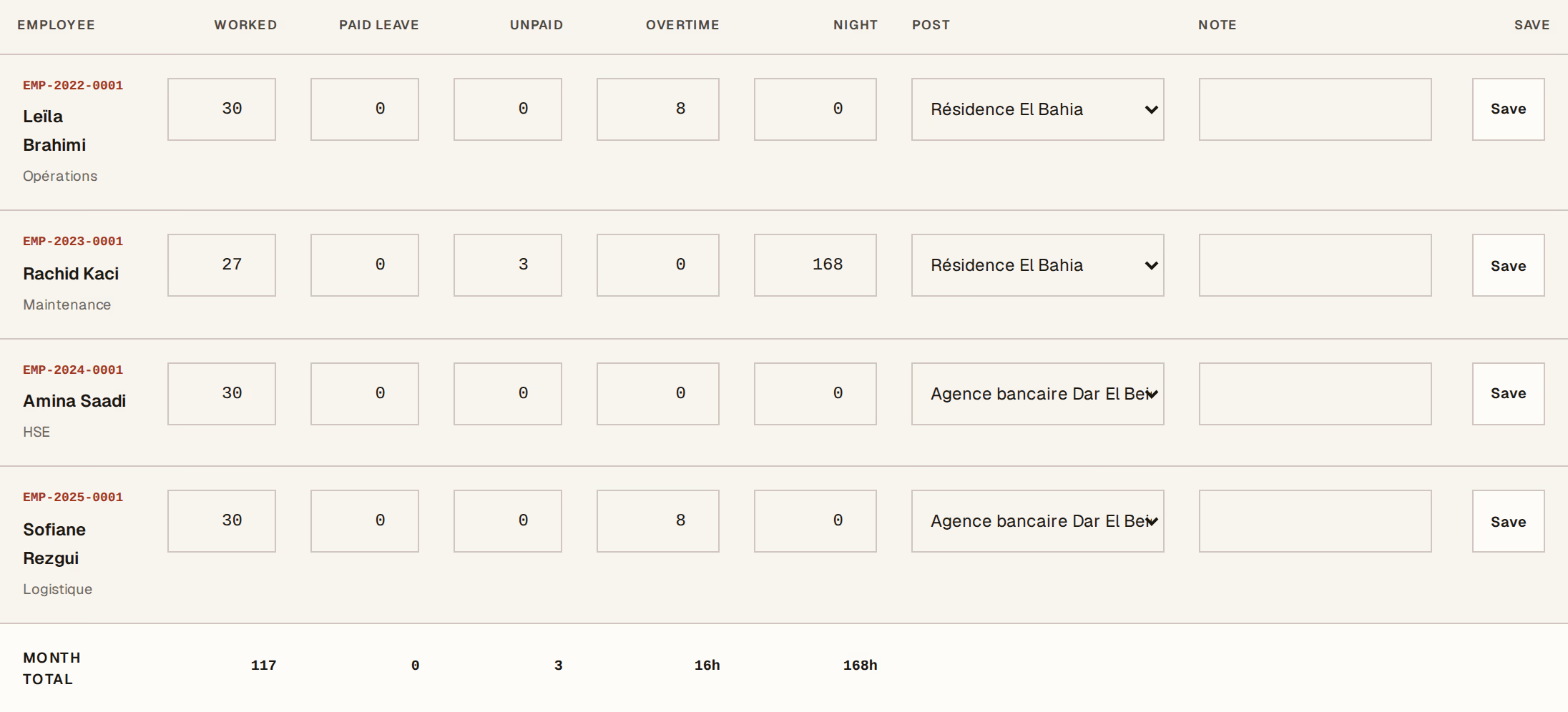
What to look at:
Days worked is the days somebody was actually on the job. On its own it does not change anyone's pay — it is what lets the work be attributed to a place, and what a supervisor can be asked to confirm.
Unpaid absence is the one that costs money. It is the only figure here that changes what is paid.
Night hours and overtime sit beside it, priced from the contract at the uplift in your payroll rules.
Rest days are not recorded, because a monthly salary already pays them. Whatever is left of the thirty days after work, leave and unpaid absence is the weekend. Giving it its own box would only be a fourth number to make disagree with the other three.
Close it
When the month is right, close it. That is a manager's decision and it is what tells payroll the sheet can be trusted.
From then on, preparing that month's payroll takes its days, its overtime and its night hours from here. The accountant can still adjust any line in the draft run — the sheet is the starting figure, not the last word.
Correcting a month you have closed
Reopen it, fix the rows, close it again.
Reopening is refused once payroll for that month has been posted, because the payslips have already paid those days and the two would disagree with nothing to say which changed. To correct a posted month, reverse the payroll run first — corrections are reversals explains why that is the shape of every correction here.
Who fills it in
Anybody with write access can fill the sheet in. Only a manager can close or reopen it.
That split is deliberate. The person who knows who turned up is a supervisor or an office manager, not the accountant, and asking the accountant to guess was the problem this screen exists to remove.
Next, you might want to
- Pay for days worked, absence and overtimeAdjust a payroll month for somebody who was away unpaid, worked extra hours, or has years of service behind them.
- Plan an absence and approve leaveRecord who is away and when, get the overlap checked, and approve or decline the request.
- Read what a site costsSee the month's labour cost of a site against what you bill for it, worked out from payroll you have already posted.