All guidesSites you staff
Post people to a site
Say who works where, in what role, on days or nights — and see at a glance which sites are short.
- Steps
- 4 · About 2 min
- Who can do this
- Owner · Manager · Team member
- Needs the module
- Sites you staff
Before you start
A site with nobody on it is a contract you are not honouring. An assignment says who is posted where, from when, and it is what lets the register answer is that one short.
Post somebody
Open the site, then use the panel on the right.
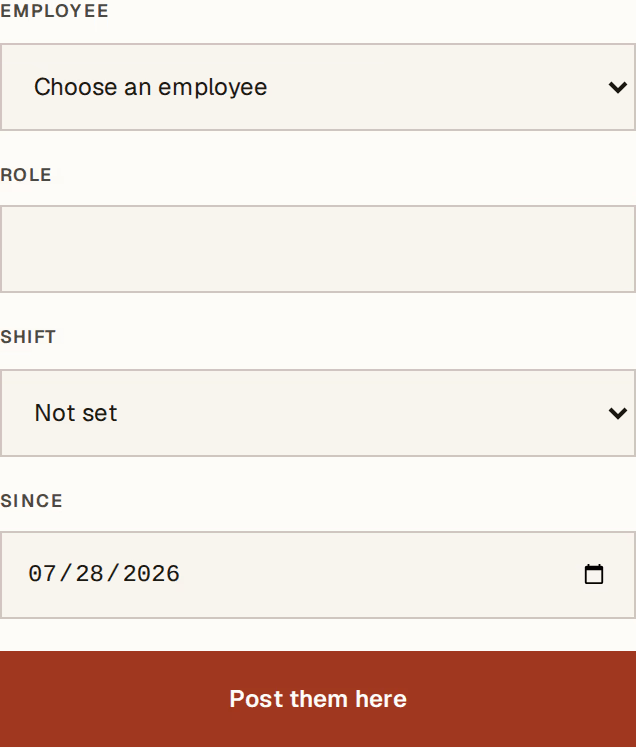
What to look at:
Employee — from your active team.
Role — chef de poste, agent, maçon. Free text, because job titles on a site are the company's own vocabulary.
Shift — day, night, rotating, or not set. This is a description of the posting, not a rota: it says what kind of hours this person works there.
Since — the date the posting starts. It cannot be before their hire date.
An assignment has no end date until somebody leaves the post. That is what open means here.
One person, one open posting
Horizon213 refuses to post somebody who already holds an open assignment somewhere else.
That is not a scheduling rule, it is a data-entry guard: one person standing at two gates on the same night is a mistake, and left alone it would count them towards two different headcounts and split their cost across two sites.
To move somebody, end the posting they hold and create the new one.
Reading the shortfall
The register shows posted / needed for every site, and marks the short ones in brick. The headline count of short-staffed sites sits at the top.
That is deliberately as far as it goes. Horizon213 does not plan next week's coverage or build a shift grid, because a week-by-week rota is a thing somebody has to maintain daily and would abandon by the second week. The headcount target answers am I short there without asking for that.
When somebody leaves a post
End the assignment. It moves into Past assignments on the site, with its dates, so last month still explains itself.
Closing the whole site ends every open posting on it at once — setting up a site covers what closing does.
Posting somebody to a site also prefills their Site on the next attendance month you open, so nobody picks the same site sixty times on the first of the month. The attendance month explains that sheet.
Next, you might want to
- Read what a site costsSee the month's labour cost of a site against what you bill for it, worked out from payroll you have already posted.
- Record the attendance monthFill in one sheet a month so payroll stops asking somebody to remember who turned up.
- Track papers that expireRecord the reference and the expiry date of the documents your people must hold, and be warned before one lapses.