All guidesStart here
Find your way around
The company you are in, the list of modules, Simple mode, and how to sign out.
- Steps
- 3 · About 2 min
- Who can do this
- Owner · Manager · Accountant · Team member · Read only
Before you start
Everything in Horizon213 hangs off one strip down the side of the screen. Learn the four things on it and the rest of the product stops being a maze.
The four things on the strip
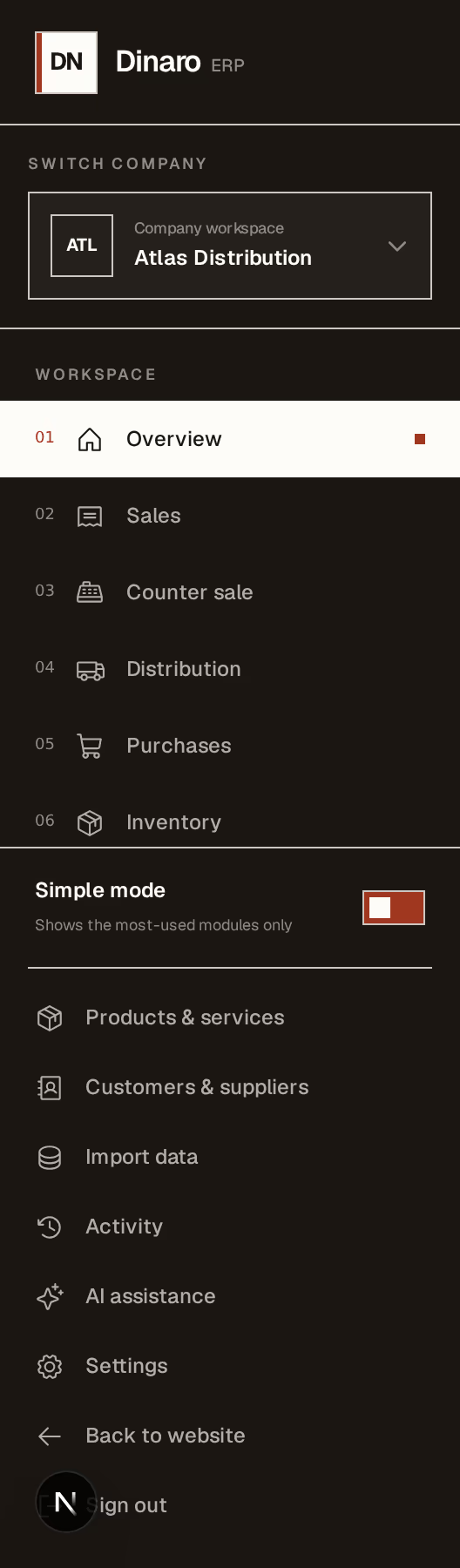
What to look at:
The company you are working in — press it to switch, or to see the whole group at once. Check this before you do anything that writes. Every invoice, payment and stock movement belongs to the company named here, and nothing warns you if it is not the one you meant. Company and group explains the two modes.
The workspace list — the day-to-day modules, numbered, in the order work usually flows: overview, sales, counter sale, distribution, purchases, inventory. The one you are on is highlighted.
Simple mode — on by default, and it shows only the most-used modules. Turn it off and the full list appears. It changes nothing about your data or your permissions; it is a shorter menu, not a smaller product.
Sign out — at the foot of the strip. On a shared machine, use it. A session left open is a session someone else is working in as you.
What is not in the list
Below the modules sit the things you touch less: products and services, customers and suppliers, import data, activity, AI assistance, settings.
If a module you expect is missing entirely, it is either hidden by Simple mode or switched off for this company. Modules are per-company, so a business that does not deliver never sees Distribution at all.
On a phone
The strip folds away behind a menu button in the top bar. Everything above is still there, and the top bar also carries the language control — which is the one thing a wide screen does not show you.
Faster than the sidebar, once you know it exists: Ctrl+K finds anything by name. Most people who use Horizon213 daily stop using the menu entirely.
Next, you might want to
- Find anything with Ctrl+KOne shortcut, a business word, and you are on the right screen — without learning where anything lives.
- One installation, several companiesWhat a company owns, what a group can see, and why the group view never lets you write anything.
- Turn modules on and offShow only the parts of Horizon213 this company actually uses, and hide the rest from everyone's screen.