All guidesMoney
Correct a posted payment
Undo a payment recorded twice, for the wrong amount, or into the wrong account — without deleting anything.
- Steps
- 3 · About 3 min
- Who can do this
- Owner · Manager · Accountant
- Needs the module
- Money
Before you start
Payments get recorded twice, for the wrong amount, or against the wrong bank account. It happens on every till and in every office, and the fix is always the same shape: the original stays, and a correction stands beside it.
You will not find a delete button. That is deliberate — cash that appeared and then vanished from your books, with nothing to say why, is exactly what an audit is looking for.
Find the payment and open the correction
The payment is reachable from two places: the Treasury list, and the document it was recorded against — the invoice, the purchase, or the credit note. Either works, and both open the same form.
Look for Correct entry beneath the payment. It is folded away by default, because most payments never need it.
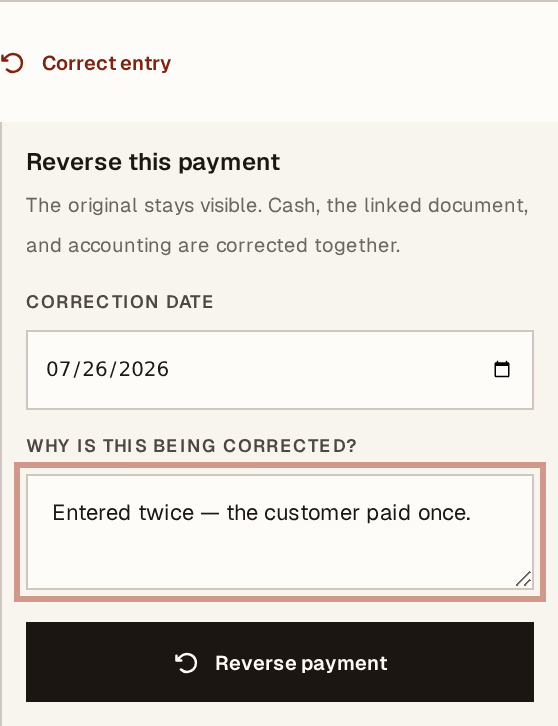
What to look at:
Correction date — when the correction takes effect. It defaults to today and cannot be earlier than the original payment; correcting a payment before it happened would produce a period where the money was negative.
Why is this being corrected? — required, and kept. Write what actually happened: entered twice, wrong bank account, should have been 12 000 not 21 000. In six months this line is the only thing that explains the pair of entries to whoever is reading.
Reverse payment — one press, and everything moves together.
What it did
Three things at once, and never one without the others: the cash comes back out of the account it went into, the linked document returns to what it was owed before the payment, and the accounting entry is reversed on the correction date.
The original payment stays on the list, marked Corrected, next to its reversal. Both are visible for good.
Then record the payment properly — the right amount, the right account, the right date. The correction cleared the way; it did not enter the replacement for you.
When it will refuse
A payment already matched on a bank statement. Unmatch it from the statement first, then correct it. The order matters: a reconciliation that points at a reversed payment is worse than one line of extra work.
A payment already corrected. Once is all it takes. If the replacement you entered is also wrong, correct that one — you will end up with a short chain of documents, and a short chain that reads honestly beats one entry that has been quietly rewritten.
Correcting a payment is a manager or accountant action, and it is final in the same way the payment was. Nothing is deleted, so nothing is lost — but the reversal is now part of the record, and the reason you typed is part of it too. Write it for someone who was not there.
Next, you might want to
- Why nothing here is ever editedHorizon213 corrects mistakes by posting the opposite, not by changing what was written. This is the rule behind almost every "you cannot" in the guides.
- Import a bank or CCP statementLoad the bank's own file so every line it contains can be checked against your cashbook.
- Follow what you are owedRead the ageing block — who is late, by how long, and which balances have no due date at all.