All guidesMoney
Follow what you are owed
Read the ageing block — who is late, by how long, and which balances have no due date at all.
- Steps
- 4 · About 3 min
- Who can do this
- Owner · Manager · Accountant · Read only
- Needs the module
- Money
Before you start
Most businesses that run short of cash are not unprofitable. They are owed money they have not chased. The ageing block on the treasury screen exists to make that visible in one glance, before it becomes a problem you feel.
Read it in two rows
Treasury — the block sits near the top.
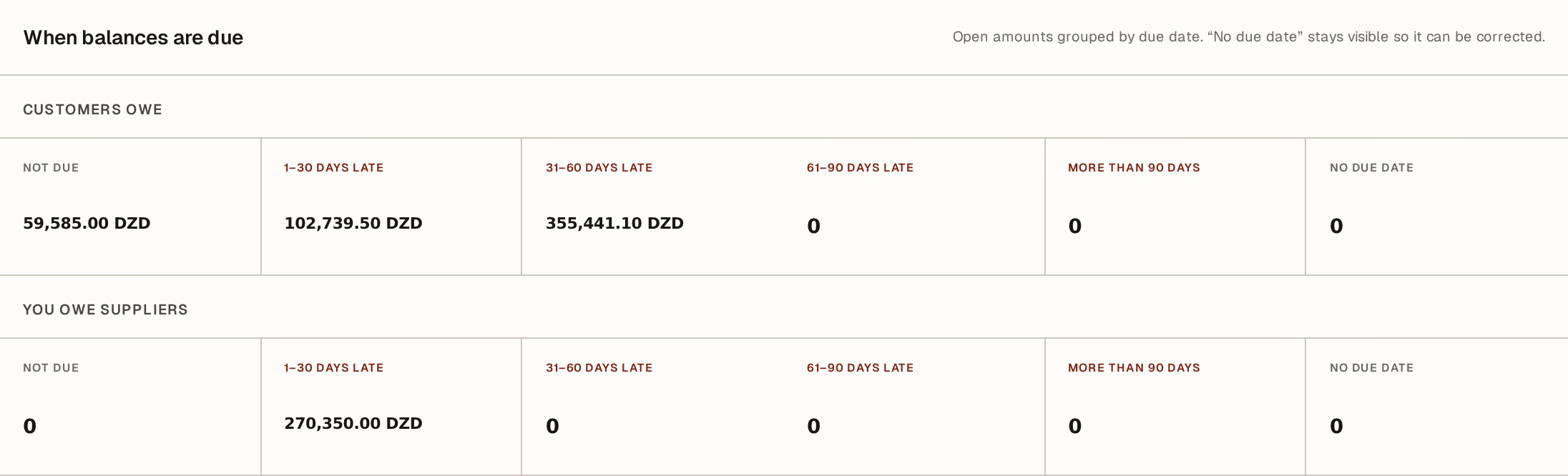
What to look at:
When balances are due — every open amount, grouped by how late it is today. It moves on its own: nothing here is a report you run.
Customers owe — money coming to you. This is the row that funds your month, and the one worth reading first.
You owe suppliers — the same arithmetic pointed the other way. Read it next to the row above: being owed 400 000 and owing 270 000 is a very different position from either number alone.
The columns run Not due, 1–30 days late, 31–60, 61–90, more than 90 days, and No due date. Lateness is counted in calendar days against the due date, not working days, and a balance due today is not yet late.
What the columns are telling you
The shape matters more than the total. A large not due column is a healthy order book. Weight sitting in 1–30 is normal friction — invoices that need a phone call. Weight in 61–90 and beyond is money you are unlikely to collect without doing something deliberate, and it rarely improves by being left alone.
Watch the drift, not the day. The same customer moving from not due to 1–30 to 31–60 over three months is telling you something the total never will.
The column people ignore
No due date deserves its own paragraph, because it is the one that hides things.
A balance with no due date can never be late — so it never appears in any overdue figure, never triggers a reminder, and quietly ages out of everyone's attention. The ERP keeps the column visible on purpose, rather than folding those amounts into not due, so that you can see them and fix them.
They usually come from two places: an invoice raised without payment terms, or an imported opening balance whose due date column was left blank. Either way the repair is the same — open the document and give it the date it actually falls due.
Acting on it
From here the useful moves are ordinary ones: send the customer their statement so the conversation is about a document rather than a number, and record what comes in as it arrives. An amount clears out of the ageing when the payment against it is recorded — so a row that stubbornly stays late after the customer has paid usually means the payment landed in the treasury without being matched to the invoice.
Ageing is calculated as of today, every time you open the screen. Screenshot it, or export it, if you need to prove what the position was on a particular date — tomorrow the same block will honestly tell you a different story.
Next, you might want to
- Send a customer statementProduce the account history for one customer over a period — every invoice, every payment, and what is left owing.
- Record money in or outEnter cash that moves for a reason no invoice covers — rent, fuel, bank fees — and pay supplier invoices.
- Import open customer and supplier balancesBring in the invoices still owed to you, and by you, on the day this ERP starts — without inventing sales that never happened here.